Final Blockout in Unreal and Lighting Pass
- Daniel Whyatt
- Oct 26, 2020
- 1 min read
Updated: Oct 27, 2020
The final blockout had finally been placed into a new unreal environment.
Got to say, it real is wonderful to see both our work, even as a base blockout, in engine like this and can't wait to eventually see the finished article.
Lighting pass was started as soon as possible. Having to make sure that the rest of the base lighting for the environment is turned off so we can gauge exactly what the interior will look like more naturally.

There will be about three different forms of light sources within the space.
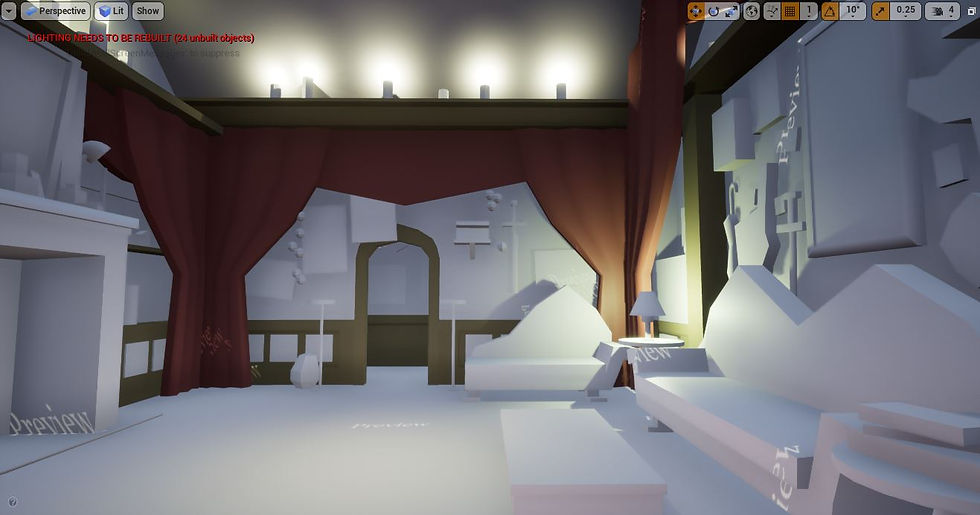
These will be lamps, candles and hovering spheres of magical glowing light.


Above image snap above was taken to try and replicate the scene from the series scene below.

The candles will go around the whole top shelves of the room. Creating not only a nice even light, but also perhaps help with making the patterned ceiling glow.
The FBX Export from Maya has had one problem though. I thought in exporting everything together I would still be able to manipulate and move the individual blockouts around the space, but I was wrong.
It is a shame after coming this far but still just wanted to quickly see what the space would look like lit up. Now that this has been done I'm going to go back into Maya and select all the walls, ceiling and assets attached to them that probably won't need moving and export them together under a new name.
The smaller and central models that will be further detailed for better refinement and possible placement into the completed later environment will each be exported from Maya into Unreal separately.


Comments